We are happy to announce the launch of Gravity Forms 2.10. This update includes various fixes and additions, including two new templates in the Gravity Forms template library…
- Added Agency Project Request Form and School Registration Form templates to the template library.
- Added Background Notification settings to the Forms > Settings page.
- Added logging when personal data is exported or deleted and when uploaded files are deleted.
A shortcut to smarter client onboarding
Our new Project Request Form Template is fully customizable – helping you qualify leads, record important project details, and start every client relationship on the right foot.
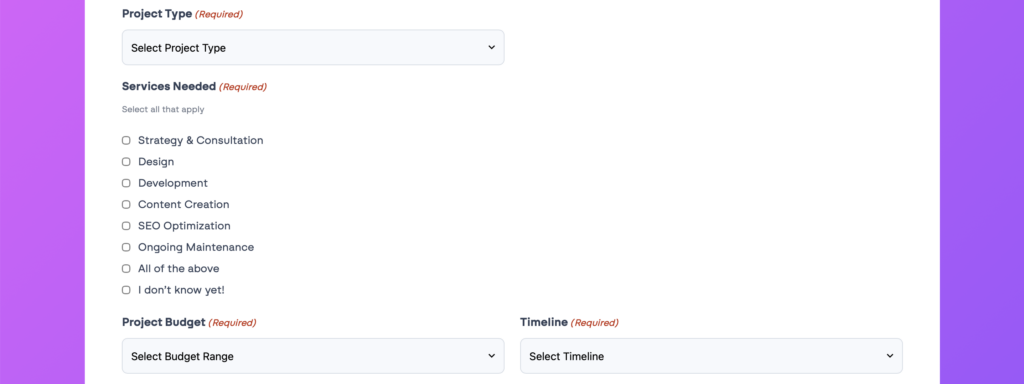
With built-in fields for project type, services required, budget, schedule, and more, you can simplify the onboarding process and focus on the opportunities that matter most.
Tip: Pair this template with Gravity Flow to automatically route new inquiries directly to your sales team. Try the free one Gravity Flow demo Today!
Collect registrations with confidence
Simplify your admissions process with a School Application Form template created to do more than just collect information. Capture student details, manage apps, and accept payments with Square in one place.
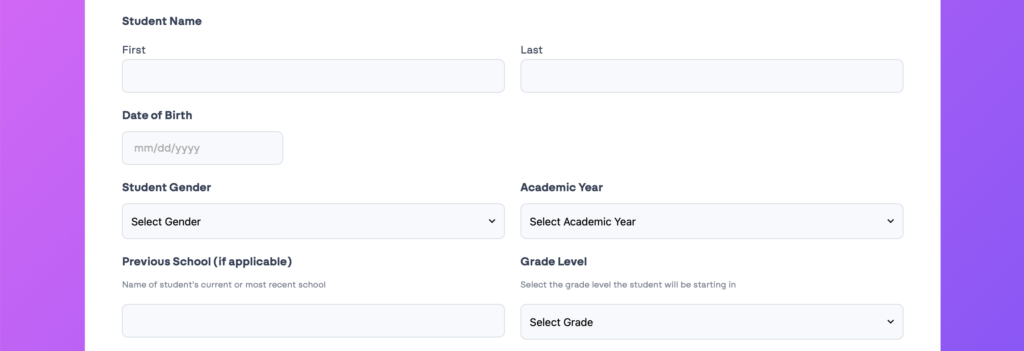
Gather contact information, grade level, program selection, supporting documents, and more in a structured workflow that keeps enrollment organized and easy to manage.
Note: Digital signature fields are supported by Square Gravity Shape Add-onwhich is included with Pro, Elite And Nonprofit license.
New setting: Background Notifications
Also new in 2.10, we’ve added a Background Notification option to the Forms → Settings page.
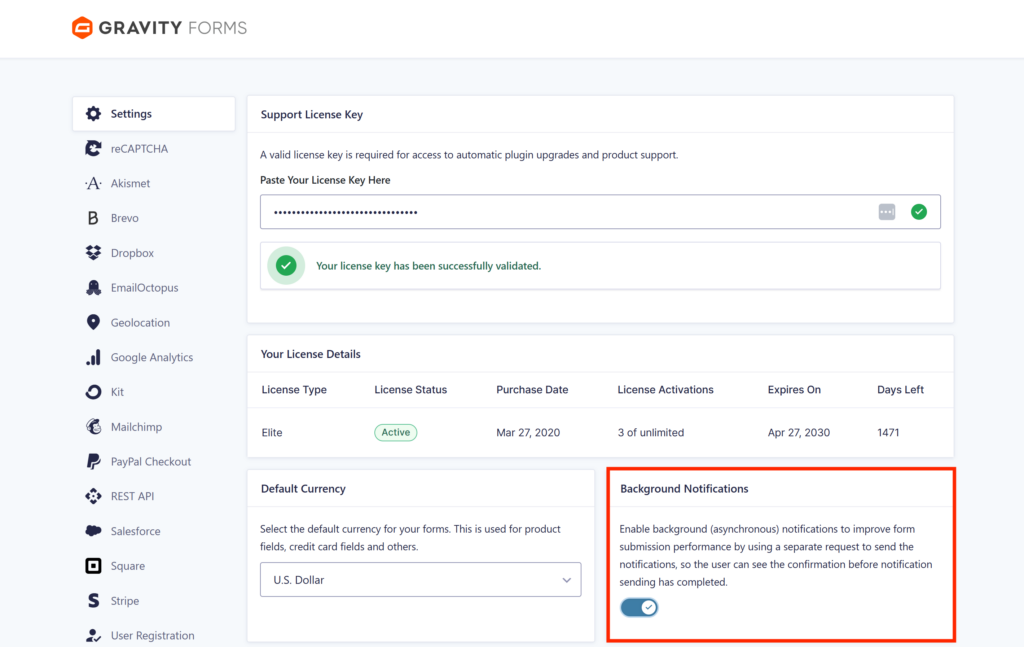
It’s enabled by default for new installations and helps your forms feel faster by sending notifications behind the scenes – so users see their confirmation straight away, without waiting for the email to finish sending.
For more information about this and other Gravity Forms settings, visit our documentation.
More reasons to choose Gravity Forms:
- Intuitive form builder – Easily create custom forms using our visual drag and drop editor – no coding required.
- Ready to use template – Get started quickly with a collection of pre-built, customizable form templates for common use cases.
- Powerful integration – Extend your forms with add-ons that connect to leading CRMs, payment processors, email marketing tools, and more.
- Developer friendly documentation – From basic tutorials to advanced customization guides, our comprehensive docs are here to help every step of the way.
- Responsive expert support – Have questions? Our knowledgeable support team is ready to help you troubleshoot and succeed.
- Email reliability with Gravity SMTP – Improve email deliverability by connecting your WordPress site to a trusted email service. Gravity SMTP is included free with an Elite license.
Want to try Gravity Forms before purchasing your license? Try the free online demo.
Gravity Forms 2.10 changelog
- Note: Under the new version system, this is a minor release.
- Added Agency Project Request Form and School Registration Form templates to the template library.
- Added edit action link to Entries list table.
- Added logging when personal data is exported or deleted and when uploaded files are deleted.
- Added support for configuring custom confirmations to be used for spam sending.
- Added support for changing the Multiple Files setting on the Upload Files field (only those added to the form from now onwards) even when the field has an entry value.
- Added Background Notification settings to the Forms > Settings page. Enabled by default for new installations, it sends notifications via a separate request, improving form submission performance, so that a confirmation can be displayed before the submission is complete.
- Fixed an issue where default data was displayed instead of saved data when you edited an existing API key.
- Fixed an issue with the Simple Contact form template that could result in column layout issues.
- Fixed a JavaScript error that occurred when a form had a price field and used page conditional logic.
- Fixed a bug that prevented the About page from loading correctly when the site language was not English.
- Fixed incorrect calculation results when the formula included a join tag for a price by option field and the selected option had a price of zero.
- Fixed deprecation notice on entry list page and feed settings page with PHP 8.5+.
- Fixed accessibility of additional icons on settings page.
- Updated save and resume and resend entry notifications to support background notifications.
- API: Added GFAPI::send_notification() to send specific notifications (supports background notifications).
- API: Set the storage type property on new File Upload fields and existing fields with Multiple Files enabled to json, so that single-file and multi-file uploaders store their values the same way.
- API: Updated the new AJAX submission process to allow submission results to be modified before the markup is reloaded via the new gform/ajax/post_submission_request filter.

Bulletin
If you want to stay up to date on what’s happening on the blog, sign up for the Gravity Forms newsletter!
“*” indicates a required field
PakarPBN
A Private Blog Network (PBN) is a collection of websites that are controlled by a single individual or organization and used primarily to build backlinks to a “money site” in order to influence its ranking in search engines such as Google. The core idea behind a PBN is based on the importance of backlinks in Google’s ranking algorithm. Since Google views backlinks as signals of authority and trust, some website owners attempt to artificially create these signals through a controlled network of sites.
In a typical PBN setup, the owner acquires expired or aged domains that already have existing authority, backlinks, and history. These domains are rebuilt with new content and hosted separately, often using different IP addresses, hosting providers, themes, and ownership details to make them appear unrelated. Within the content published on these sites, links are strategically placed that point to the main website the owner wants to rank higher. By doing this, the owner attempts to pass link equity (also known as “link juice”) from the PBN sites to the target website.
The purpose of a PBN is to give the impression that the target website is naturally earning links from multiple independent sources. If done effectively, this can temporarily improve keyword rankings, increase organic visibility, and drive more traffic from search results.
Comments are closed, but trackbacks and pingbacks are open.