We are happy to announce that we have updated the Gravity Forms EmailOctopus integration. With EmailOctopus v2.0, you’ll find a number of updates…
- Added support for updating existing contacts in EmailOctopus.
- Updated to use EmailOctopus API v2.0 instead of EmailOctopus API v1.6, which is now deprecated. API keys before 2024-10-07 need to be regenerated.
Notes: EmailOctopus API v1 is no longer actively maintained. If you create an API key before October 2024, it will not work with API v2. See the EmailOctopus documentation for steps to migrate to API v2.
Always keep customer info in sync
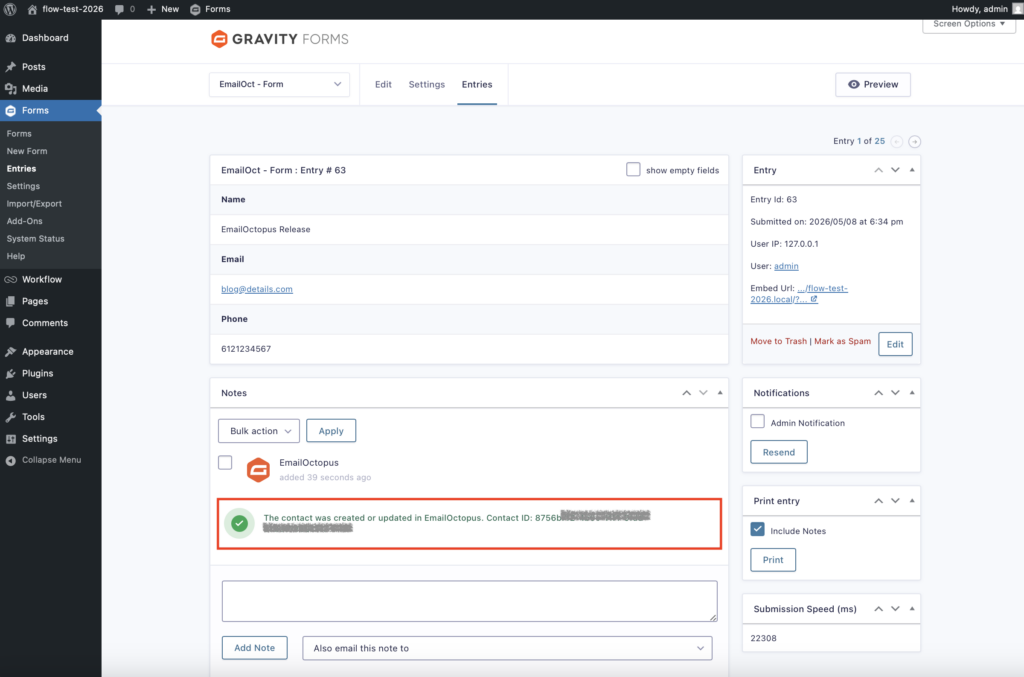
Keeping your EmailOctopus audience up-to-date just got a lot easier in v2.0.
We’ve added support for updating existing contacts, allowing you to seamlessly sync customer information without creating duplicates. Automatically update names, custom fields, and contact details while keeping your email workflow clean, accurate, and running smoothly.
Grow your email list with Gravity Forms and EmailOctopus
Connect Gravity Forms to EmailOctopus and automatically send form submissions to your email list. With easy setup, field mapping, and conditional logic, you can create targeted email workflows in minutes.
Add subscribers to specific lists, trigger automation instantly, and control exactly who syncs based on form responses. If you run a newsletter, community, or side project, EmailOctopus gives you affordable email marketing tools without unnecessary hassle.
EmailOctopus Features
- Automatically add form submissions to EmailOctopus lists
- Update existing contacts
- Map form fields to customer and custom field data
- Trigger email automation when users subscribe
- Use conditional logic to control when contacts sync
- Create opt-in workflows and segment customers based on responses
- Responsive email templates and drag-and-drop email builder
For more information on setting up EmailOctopus, be sure to read the Gravity Forms documentation and start using EmailOctopus today.
EmailOctopus v2.0 changelog
- Added support for updating existing contacts in EmailOctopus.
- Updated to use EmailOctopus API v2.0 instead of EmailOctopus API v1.6, which is now deprecated. API keys before 2024-10-07 need to be regenerated.
If you are a Gravity Forms licensee, EmailOctopus can be updated to v2.0 in your WordPress dashboard, or downloaded manually from your Gravity account.

Bulletin
If you want to stay up to date on what’s happening on the blog, sign up for the Gravity Forms newsletter!
“*” indicates a required field
PakarPBN
A Private Blog Network (PBN) is a collection of websites that are controlled by a single individual or organization and used primarily to build backlinks to a “money site” in order to influence its ranking in search engines such as Google. The core idea behind a PBN is based on the importance of backlinks in Google’s ranking algorithm. Since Google views backlinks as signals of authority and trust, some website owners attempt to artificially create these signals through a controlled network of sites.
In a typical PBN setup, the owner acquires expired or aged domains that already have existing authority, backlinks, and history. These domains are rebuilt with new content and hosted separately, often using different IP addresses, hosting providers, themes, and ownership details to make them appear unrelated. Within the content published on these sites, links are strategically placed that point to the main website the owner wants to rank higher. By doing this, the owner attempts to pass link equity (also known as “link juice”) from the PBN sites to the target website.
The purpose of a PBN is to give the impression that the target website is naturally earning links from multiple independent sources. If done effectively, this can temporarily improve keyword rankings, increase organic visibility, and drive more traffic from search results.
Comments are closed, but trackbacks and pingbacks are open.